

Microsoft Back to School
This is a contribution to the Microsoft Bloggers program. All views expressed are my own.
Even though summer feels like it’s just beginning, my children and I are already discussing which teachers they’re hoping to have. Supermarkets are stocking up on the latest backpacks and school supplies, while clothing retailers are beginning to showcase their fall and winter collections. It’s absolute chaos, I tell you!

Our home is filled with a mix of anticipation and anxiety. A fresh school year introduces new challenges and experiences for everyone. To gauge the most pressing concerns as the 2016 school year approaches, Bing analyzed its extensive search data and predictive algorithms, resulting in its top five predictions of what parents are likely to focus on this upcoming season:
- Predictions indicate that the primary concern for parents this back-to-school season will be planning meals, particularly brainstorming novel ideas for packing nutritious school lunches.
- Financial implications of the back-to-school season rank second among parents’ stressors. Cost-related searches suggest a primary focus will be on school uniform and supply expenses, including tablets.
- The third prediction highlights social challenges students may face upon returning to school, such as peer pressure or bullying.
- After-school care also weighs heavily on parents’ minds, with the fourth prediction showing a focus on finding babysitters, after-school clubs, and transportation options.
- With education quality being a hot topic, the fifth prediction points towards concerns like funding shortages and STEM education. Notably, Bing observes an upward trend in searches for educational apps, online learning games for kids, and online schooling options year after year.
As my son embarks on his first year of college, I’m equipping him with Microsoft devices and services. A blend of these tools can help manage numerous concerns and ensure students of all ages have the resources they need to thrive in the upcoming academic year.
Consider the newly introduced Surface 3—the device offers a subscription to Office 365 Personal along with OneDrive cloud storage and 60 Skype world minutes every month for one year. The free Windows 10 upgrade available from July 29 will streamline homework and enhance productivity. And don’t forget, with the Windows 10 upgrade, you can download the Minecraft Windows 10 Edition for free—a fun addition to learning!
|
|
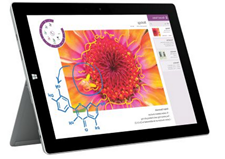
Microsoft Surface 3 Experience the ideal fusion of performance and affordability with the new 10-inch Surface 3. Featuring Windows 8.1 and a free upgrade to Windows 10 (coming July 29!), Surface 3 supports all your favorite applications. Included is a one-year subscription to Office 365 Personal, providing OneDrive cloud storage to prepare you for college. Monthly, enjoy 60 Skype world minutes for a full year, keeping you connected with loved ones back home. You can choose from a vibrant Type Cover available in five colors: red, bright red, blue, bright blue, and black. Priced at $499 (64GB and 2GB RAM; encompassing Office 365 Personal), Surface 3 is sold at www.microsoftstore.com or at your local Microsoft Retail Store. Find a location near you here. |
|
|
Office 365 The new Office for Mac empowers students of all ages to maximize their productivity—anytime, anywhere, with anyone.
Stretch Your College Budget: Understandably, college students are often operating on a tight budget with tuition, rent, and food. Office 365 University subscriptions are available for four years at $79.99—equating to less than $1.67 monthly. Install it on two devices, allowing flexibility to work from either your computer or tablet. Keep it Together: OneNote is the ultimate tool for capturing ideas, notes, and to-dos in one convenient spot, applicable at home, school, or work for various tasks such as recipe collections, class notes, and projects. Add text, to-dos, pictures, files, and voice memos effortlessly. Show & Tell: Impress your teachers with a wonderfully designed presentation without needing design skills. Sway (available via any web browser at Sway.com or as an iPhone app) allows you to compile content from the web, social media, and incorporate videos, images, and your narratives into a stunning digital canvas. The end product is vibrant, dynamic, and surprisingly easy to create. Obtain an Office 365 subscription at www.microsoftstore.com or visit your local Microsoft Retail Store. Find a location near you. |
|
|
Windows 10 A FREE upgrade to Windows 10 will be available starting July 29! Ensure that your new Windows device is upgraded for the start of classes this school year. Discover the exciting new features in this operating system that will simplify homework and enhance productivity: · With Cortana, your very own personal digital assistant, you can go beyond mobile use—ask her to locate files, send emails, play music, retrieve photos, find apps, and more from your PC. · Microsoft Edge: The newly designed browser for Windows 10 enables you to write on the web, includes built-in note-taking features, and integrates seamlessly with Cortana for distraction-free reading. · Gaming Beyond Borders: Your games, friends, and achievements will be accessible across Xbox One and Windows 10 devices. Xbox Live is embedded within Windows 10, offering the largest gaming network available. Plus, play Xbox One games directly on your desktop, laptop, or tablet within your home network. · The Return of the Start Menu! Everything you loved about the start menu is back, now integrated within the live tile experience. Head to www.windows.com to reserve your complimentary Windows 10 download. |
|
|
Digital Gift Cards Digital gift cards for Xbox and Windows maintain productivity and entertainment for students returning to school this autumn. Gift personalized cards enabling students to purchase the necessary apps, games, music, and movies on their Xbox and Windows devices. These digital gift cards are excellent for back-to-school gifts or as an allowance treat. Visit http://commerce.microsoft.com/gifting to acquire a digital gift card today, available in various designs and price increments of $10, $15, $25, $50, $75, or $100. |
|
|
Minecraft A new iteration of “Minecraft” dubbed “Minecraft: Windows 10 Edition Beta” is on its way. Similar to the original release, this version will evolve with user feedback. Existing PC edition players can download Windows 10 beta version at no cost. New users can acquire “Minecraft: Windows 10 Edition” at a reduced price of $10 during the beta period. Those who download “Minecraft: Windows 10 Edition” while in beta will retain access after its full launch and receive all future updates free of charge. Download the Minecraft beta or Minecraft Windows 10 Edition at the Windows 10 Store starting July 29. |
|
|
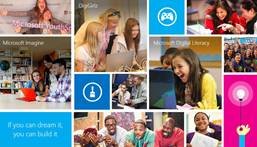
Microsoft YouthSpark offers no-cost resources that empower students for academic success, focusing on essential technology, computer science, and coding skills! · Coding for Everyone: Explore Microsoft Imagine for free online coding tools, games, and tutorials that help students transform their ideas into the next major app or game. Whether you’re a novice coder, studying it in school, or planning a career in technology—dream big, think creatively, and boldly realize your concepts. · Empower Girls in Tech: DigiGirlz provides free online courses and events tailored for girls by women in the tech sector, offering them a chance to explore technology-related careers, connect with Microsoft professionals, and engage in hands-on workshops. · Confidence with Computing: Microsoft Digital Literacy courses cater to those new to computing or those with some experience. These programs foster essential skills, improve online safety, and raise awareness about tech career possibilities. · Stay Connected Year-Round: Keep informed about all YouthSpark initiatives in your community and globally via the YouthSpark Hub. |


Comments
Add Your Comment Cancel reply

Susan McNeill
says
The new Surface looks amazing! It would be perfect for my daughter when she heads off to college next year!
Dandi D
says
This would be incredibly useful for our family!
Sandy Weinstein
says
I can’t believe back-to-school sales have already started; it feels like they just got out! I appreciate the Surface—it’s compact, lightweight, and highly versatile. I’m a bit apprehensive about Windows 10 since Windows 8 was quite troublesome; I’ve read there might be compatibility issues with my antivirus and Chrome.
Rosie
says
The Microsoft Surface looks like an excellent product. There’s so much to prepare for back-to-school, and the rush at stores will begin soon. I’m hoping for a tax-free weekend!
CR Williams
says
I would love to get one of these for my daughter for school!
courtney b
says
Thanks for all the tips! I went through all of them and made a list. This would be so beneficial for my daughter’s schoolwork!